One payment, no renewals · 60-day money-back guarantee
Remote staff time tracking. One payment. Yours for life.
Tracked hours, activity, screenshots and timesheets that answer “is my team actually working?” — from $99, once. No per-seat subscription, ever.
See lifetime pricing Try the live demo
Windows & macOS Licence code emailed instantly Screenshots blurred or detailed — your call
Built by a company that runs distributed teams across Australia, the Philippines, India and Vietnam. Open Pantry Tech Pty Ltd replaced the per-user tracker it had paid for every month, for years, with AirStaff — and now sells it worldwide.
macOS Windows
The maths
One payment, or the same bill every month for as long as you have staff
A 15-person team over three years, against a plan billed at US$10 per user per month — Hubstaff’s published Team price on annual billing, checked 10 August 2026.
- $5,202
- saved over three years versus the 15-user plan at list price
- 40 days
- until Tier 2 has paid for itself against that plan
- $13.20
- lifetime cost per seat on Tier 2 — not per month, ever
The full side-by-side, including what each product does and doesn’t include, is on the AirStaff vs Hubstaff page.
AirStaff Tier 2 — $198 once$10 / user / month plan
How it works
Three steps from checkout to a team dashboard
-
Buy, redeem and invite
Pay once by card. One licence code carrying your whole tier arrives by email straight away. Paste it at signup, create your company, invite staff with a role and a team. Codes stack, so a second code moves you up a tier.
-
Staff install and consent
Each person installs the tray app and accepts a monitoring notice. Nothing is recorded until they do. Notice periods — 14 days in New South Wales, for example — are enforced by the server, not by memory.
-
You get answers, not raw data
Team activity shows who is on track, who needs attention and why. Flags surface on their own. A Monday-morning digest lands in your inbox without anyone running a report.
What AirStaff is. AirStaff is employee time-tracking and workforce-monitoring software for companies with remote or offshore staff: a small desktop agent for Windows and macOS records tracked time, keyboard and mouse activity counts, periodic blurred screenshots, and the app or website domain in use — only while the staff member is clocked in and only after they have accepted a monitoring notice. The dashboard turns that into timesheets, reports and a weekly digest. Unlike subscription trackers, AirStaff is sold as a lifetime licence: one payment covers a fixed number of staff seats for the life of the product, with no per-user monthly fee.
The dashboard
The screens you’ll actually open
Real screens from the live demo, Brightline Demo Co. Open it yourself — no sign-up, no card.
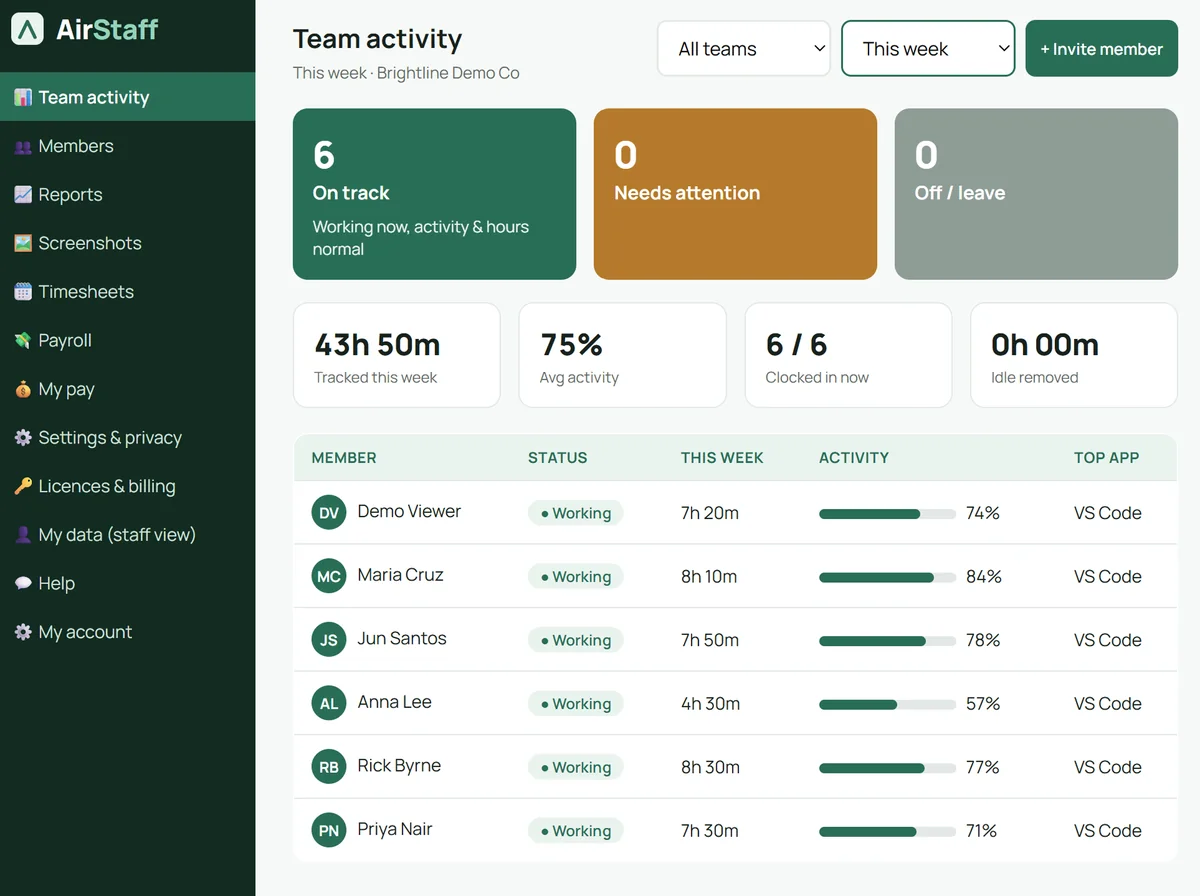
Who is on track, at a glance
Three counts at the top — on track, needs attention, off or on leave — then every person with today’s hours, activity and the app they spent most time in.
- Filter by team and week
- Idle time removed before it’s counted
- Invite a member from the same screen
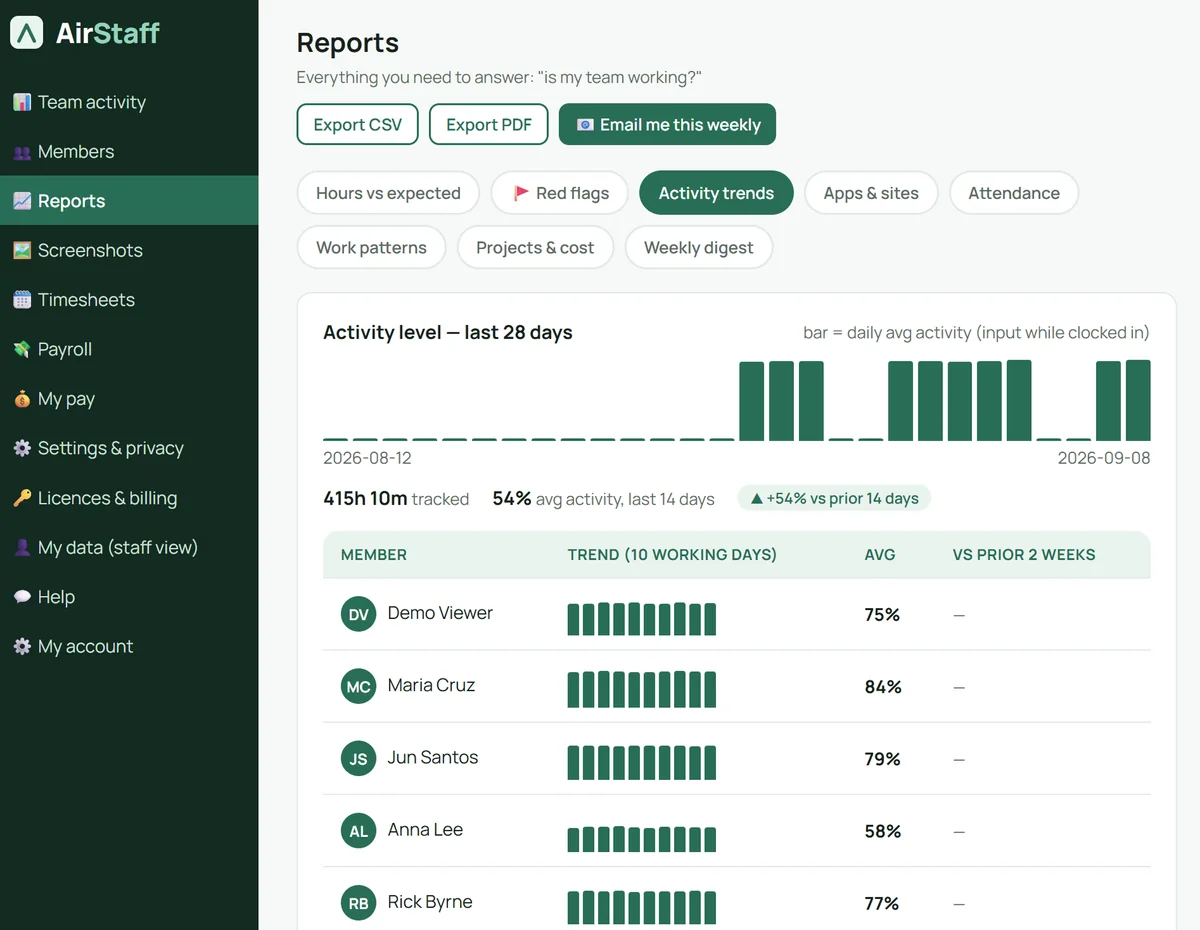
Is activity going up or down?
Twenty-eight days of daily activity for the team, then a ten-day trend per person against their prior two weeks. Export CSV or PDF, or have it emailed every Monday.
- Eight reports: hours vs expected, red flags, attendance, work patterns, projects & cost, weekly digest
- Activity = input while clocked in, counted not recorded
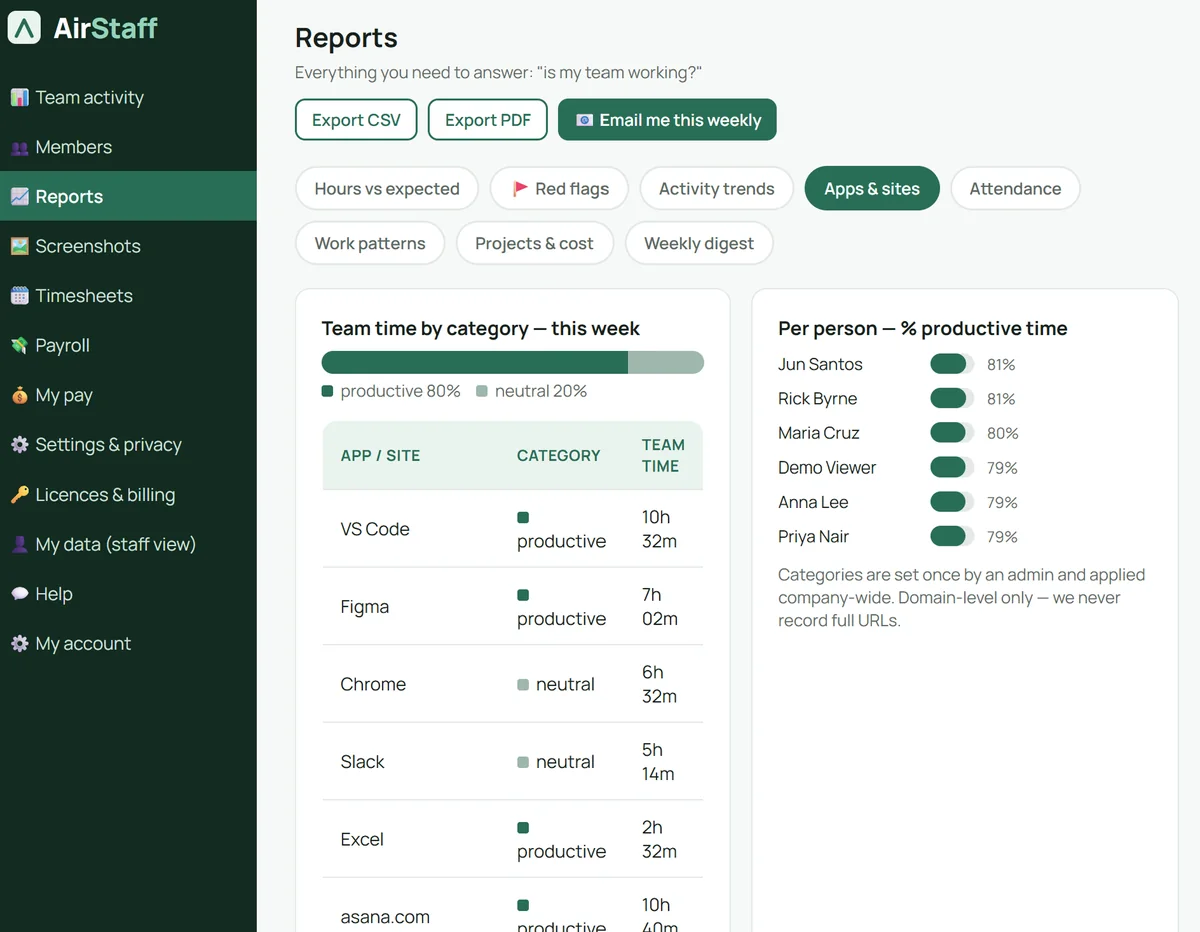
Where the hours go
Apps and site domains ranked by team time, each tagged productive or neutral once by an admin and applied company-wide. Then the productive share per person.
- Domain only — full URLs are never recorded
- Categories set once, applied to everyone
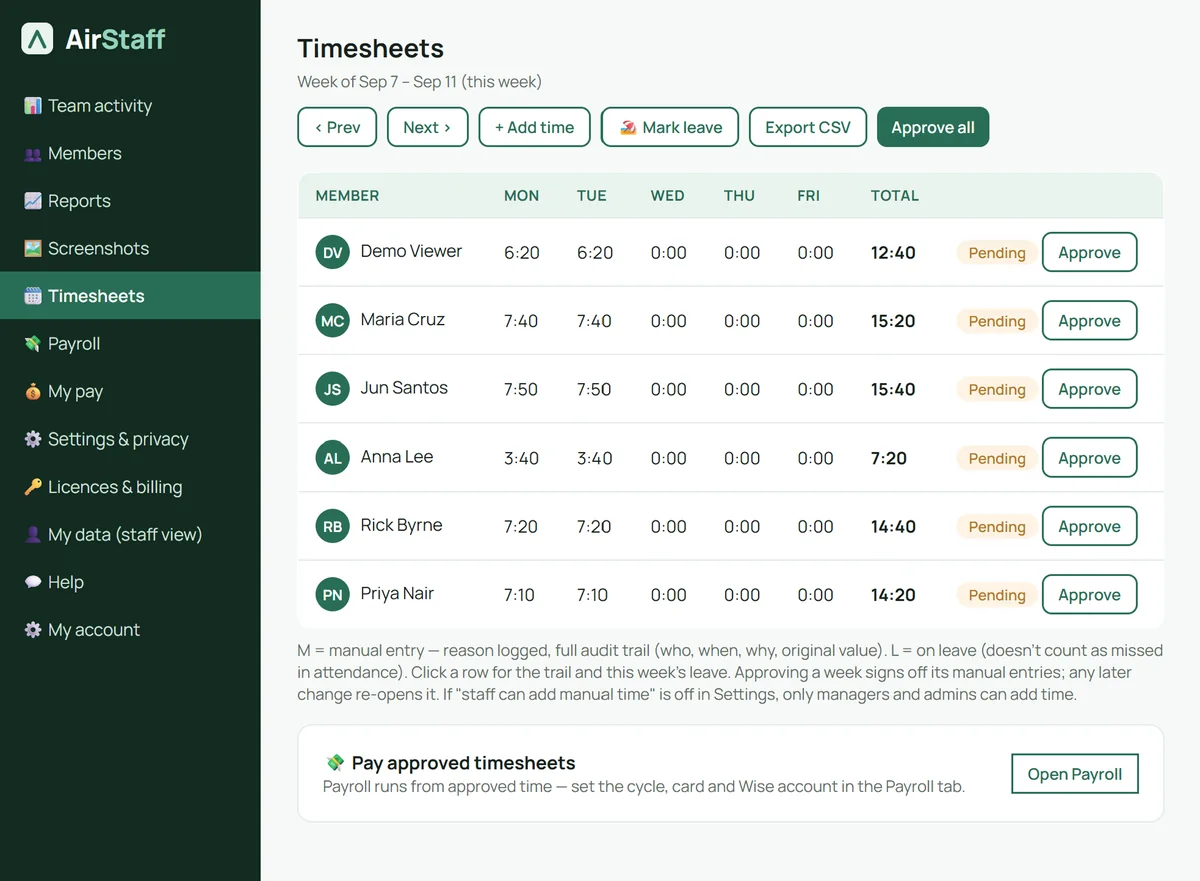
Timesheets that survive an audit
A weekly grid, approve per person or all at once. Manual entries are marked, need a reason and keep the original value and who changed it. Approved time flows straight into Payroll.
- Leave marked here, so it never counts as missed
- You choose whether staff can add manual time at all
What you get
Answers for you. Fair rules for your staff. Nothing to renew.
For you
The question is “is my team actually working?” Every screen exists to answer it in under a minute.
Team activity and flags
Who is on track, who needs attention and why. Hours against contracted schedule, activity trends, apps and sites, attendance and work-pattern heatmaps. CSV or PDF.
Timesheets that survive an audit
Weekly grid with approvals. Manual entries are flagged, need a reason, and keep the original value and who changed it. You decide whether staff may add manual time at all.
Monday digest
Tracked hours, who is on track, who needs a look — in your inbox at 8am, in your organisation’s timezone, before anyone opens a report.
For your staff
Tracking that doesn’t feel like surveillance. Everyone can see exactly what is captured — and what never is. Read exactly what is and isn’t recorded.
Detailed or blurred — you choose
Detailed low-res by default, so you can see the screen: readable, shrunk to 1024px, 50–90 KB, never full resolution. Or blurred at the instant they’re taken, so the raw frame never touches disk. Staff always see which.
Counted, never recorded
Keyboard and mouse activity is counted, not captured. Domain-only URLs. No webcam, no microphone, no files, no messages.
My data, for everyone
Each person sees their own hours, their own screenshots, their consent status, and can download everything AirStaff holds about them in one click.
What a stored screenshot looks like (blurred mode)Blurred before it is saved, deleted automatically after 60 days. Enough to see that work is happening; not enough to read a message. Detailed mode keeps it readable, but small.
What activity means hereA count of how much someone typed and clicked. Which keys, what was typed, and where — never.
For your budget
One payment covers a fixed number of seats for the life of the product.
Nothing to renew
All v1.x features, for the seats in your tier, for as long as we operate AirStaff. No per-user monthly fee.
Codes stack
Growing later? Redeem another code and move up a tier, or add seats at $3 per seat per month for a busy quarter.
Idle is never paid
Idle time is detected and never counted toward paid hours — so the timesheet you approve is the time that was worked.
Why we built it
We have a lot of remote staff across the Philippines, India and Vietnam, and Hubstaff was costing us a serious amount every single month. Now staff track and log their hours themselves, and I get the high-level reporting to make sure everyone’s on task without micromanaging.
 Geoff PhilcoxFounder, Open Pantry Tech Pty Ltd · remote team across Australia, the Philippines, India and Vietnam
Five years · 15 staff$10 / user / month
- 2022
- $1,800
- 2023
- $3,600
- 2024
- $5,400
- 2025
- $7,200
- 2026
- $9,000
- Paid to a subscription tracker, and still paying
- $9,000
- AirStaff Tier 2, same 15 staff, once
- $198
- $8,802 kept over the same five years — $13.20 per seat, for life.
List price, annual billing, US$, checked 10 August 2026. Cumulative by year.
Lifetime pricing
Pick the tier that covers your team. Pay once.
Card checkout. Your licence code arrives by email straight away. Prices in US dollars.
Tier 1 · Small team
$19.80 per seat, for life
- Full tracking, screenshots and activity
- Timesheets, CSV and PDF exports
- Reports suite
Tier 2 · Growing team
$13.20 per seat, for life
- Everything in Tier 1
- Projects and clients
- Weekly Monday digest
Tier 3 · Agency
$9.90 per seat, for life
- Everything in Tier 2
- API access
- Priority support
Tier 4 · Scale
$7.92 per seat, for life
- Everything in Tier 3
- White-label reports
- All future v1.x features
A seat is a person actively tracked in a calendar month. Extra seats $3 per seat per month, or stack another code. Already have a code from AppSumo or DealMirror? Redeem it at signup. Full pricing detail.
Questions people actually ask
How much does AirStaff cost compared with a monthly time tracker?
AirStaff is a one-off payment: $99 for 5 staff seats, $198 for 15, $297 for 30 and $396 for 50, in US dollars. A subscription tracker billed at US$10 per user per month costs a 15-person team $1,800 a year, or $5,400 over three years. AirStaff Tier 2 covers the same 15 people for $198, once.
How do I buy AirStaff and how is the licence delivered?
Click a Buy button, pay by card through Stripe Checkout, and a single lifetime licence code covering your whole tier is emailed to you the moment payment clears. You redeem it when you create your company account, and every direct purchase carries a 60-day money-back guarantee.
What does a lifetime licence actually mean at AirStaff?
It means the seat allowance in your tier is yours for the life of the AirStaff product — for as long as we commercially operate it — not for the lifetime of the purchaser. It covers all v1.x features. Future major paid modules, such as payroll payouts, are optional add-ons rather than something that removes what you already bought.
Can my staff see what AirStaff records about them?
Yes, and that is deliberate. Every staff member has a "My data" screen showing their own tracked hours, their own screenshots, exactly what is and is not captured, and their consent status. They can download everything AirStaff holds about them and request corrections or deletion.
Does AirStaff work on both Windows and Mac computers?
Yes. The desktop agent is a small tray application for Windows and macOS. A Linux agent is on the public roadmap but is not part of version 1.
How is a seat counted if someone only works part of the month?
A seat is a member with at least one tracked time slot in a calendar month. Someone you invite but who never tracks time does not use a seat. Deactivating a member frees their seat from the following month, and a member who is already tracking mid-month is never cut off part way through.
Does AirStaff record keystrokes or read my staff’s messages?
No. Keyboard and mouse activity is counted, never captured — AirStaff stores the number of events, not what was typed. It does not record message contents, files, webcam or microphone, and it records nothing at all while a person is clocked out.
What happens to screenshots and tracking data over time?
Screenshots are capped at 60 days by default and deleted automatically each night; an employer can set a shorter cap, and extending beyond 60 days is a paid add-on. Raw 10-minute time slots roll up into daily summaries after 90 days and the raw slots are deleted. If you delete your organisation, everything is purged within 30 days.
Stop renting your time tracker.
Lifetime licences from $99. 60-day money-back guarantee on every direct purchase.